
https://openweathermap.org/current
https://api.openweathermap.org/data/2.5/weather?lat=37&lon=126&appid=%7BAPI%20key%7D
https://api.openweathermap.org/data/2.5/weather?lat=37&lon=126&appid=…
섭씨온도로 https://api.openweathermap.org/data/2.5/weather?lat=37&lon=126&appid=…&units=metric
https://pub.dev/packages/geolocator 디바이스 현재위치 가져오기 https://pub.dev/packages/http
//main.dart
import 'package:flutter/material.dart';
import 'homepage.dart';

void main() {
  runApp(const MyApp());
}

class MyApp extends StatelessWidget {
  const MyApp({super.key});

  // This widget is the root of your application.
  @override
  Widget build(BuildContext context) {
    return MaterialApp(
      title: 'Flutter Demo',
      theme: ThemeData(
        colorScheme: ColorScheme.fromSeed(seedColor: Colors.deepPurple),
        useMaterial3: true,
      ),
      home: const MyHomePage(),
    );
  }
}
//homepage.dart
import 'package:flutter/material.dart';
import 'package:geolocator/geolocator.dart';
import 'package:http/http.dart' as http; // 기존 이름이 너무 단순해서 http로 이름지정
import 'dart:convert';
const apiKey = '';
class WeatherData {
final String city;
final String weatherState;
final int temperature;
final int humidity;
WeatherData(
{required this.city,
required this.weatherState,
required this.temperature,
required this.humidity
//required - 입력해야한다는 의미
});
}
class MyHomePage extends StatefulWidget {
const MyHomePage({super.key});
@override
State<MyHomePage> createState() => _MyHomePageState();
}
class _MyHomePageState extends State<MyHomePage> {
double? lat;
double? lon;
Future<WeatherData>? weatherData;
@override
void initState() {
super.initState();
//initState는 내장함수, StatefulWidget가 처음 만들어질때 한번 실행
// var position = _determinePosition();
// // await을 안붙였으니 future객체
// position.then((result){
// //position객체가 도착한 다음 행할 함수, result가지고 뭘 할지
// print(result.latitude);
// print(result.longitude);
// });
weatherData = _determineWeather();
}
Future<WeatherData> _determineWeather() async {
Position position;
bool serviceEnabled;
LocationPermission permission;
// Test if location services are enabled.
serviceEnabled = await Geolocator.isLocationServiceEnabled();
if (!serviceEnabled) {
// Location services are not enabled don't continue
// accessing the position and request users of the
// App to enable the location services.
return Future.error('Location services are disabled.');
}
permission = await Geolocator.checkPermission();
if (permission == LocationPermission.denied) {
permission = await Geolocator.requestPermission();
if (permission == LocationPermission.denied) {
// Permissions are denied, next time you could try
// requesting permissions again (this is also where
// Android's shouldShowRequestPermissionRationale
// returned true. According to Android guidelines
// your App should show an explanatory UI now.
return Future.error('Location permissions are denied');
}
}
if (permission == LocationPermission.deniedForever) {
// Permissions are denied forever, handle appropriately.
return Future.error(
'Location permissions are permanently denied, we cannot request permissions.');
}
// When we reach here, permissions are granted and we can
// continue accessing the position of the device.
position = await Geolocator.getCurrentPosition();
lat = position.latitude;
lon = position.longitude;
// print(lat);
// print(lon);
http.Response response = await http.get(Uri.parse(
'https://api.openweathermap.org/data/2.5/weather?lat=$lat&lon=$lon&appid=$apiKey'));
Map<String, dynamic> weatherJson = jsonDecode(response.body);
// print(weatherJson['name']);
return WeatherData(
city: weatherJson['name'],
weatherState: weatherJson['weather'][0]['main'],
temperature: weatherJson['main']['temp'].toInt(),
humidity: weatherJson['main']['humidity'].toInt());
}
@override
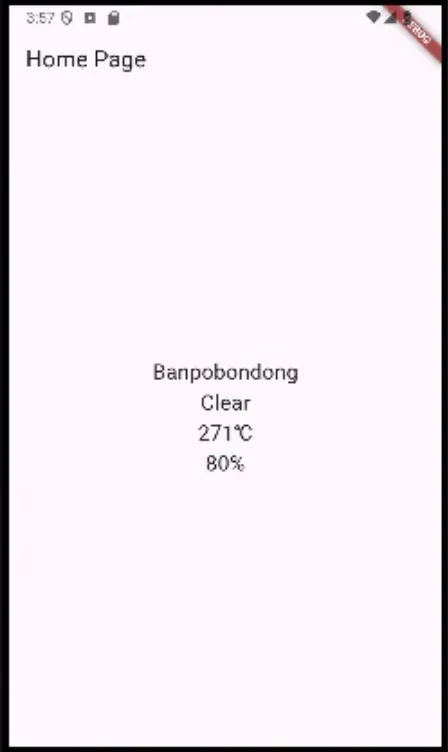
Widget build(BuildContext context) {
return Scaffold(
appBar: AppBar(
title: Text('Home Page'),
),
body: Center(
child: FutureBuilder(
future: weatherData,
builder: (context,snapshot){
if (snapshot.hasData){
return Column(
mainAxisAlignment: MainAxisAlignment.center,
children: [
Text(
snapshot.data!.city,
style: TextStyle(fontSize: 20),
),
Text(
snapshot.data!.weatherState,
style: TextStyle(fontSize: 20),
),
Text(
'${snapshot.data!.temperature}\u2103',
style: TextStyle(fontSize: 20),
),
Text(
'${snapshot.data!.humidity}%',
style: TextStyle(fontSize: 20),
),
],
);
} else {
return CircularProgressIndicator();
// initState를 받아오지만 끝나지 않은 상태에서 buildmethod를 호출할 것이다
// 로딩중일때 스패닝이 돌도록
}
},
)),
);
}
}
Comments